Edistyneet tilastot tarkkuusviljelyn hallintavyöhykkeille

The accurate calculation of statistics is a cornerstone of precision agriculture data analysis. GeoPard has added more detailed statistical precision calculations to the agriculture zones created on the platform to ensure that your maps and the analytic conclusions you draw from them are precise and reliable. 

Advanced statistics are calculated per zone, containing the attributes: minimum ja maximum values of the vegetation index (or other attributes), medianaveragestandard deviation, and the sum of all the values in the zone.

The median is the middle value of a dataset that has been numerically ordered, as opposed to the average. This relates to the standard deviation, which reflects how the data is arranged around the average value.

A low standard deviation suggests that the data in a given zone is grouped closely around the average, whereas a high standard deviation indicates that the zone data is spread out more widely around the average.

The sum attribute is simply the total sum of all pixel values in that zone. Before any stats are calculated for your zones, all the outliers or anomalous data points are removed to prevent the creation of misleading statistics that do not accurately reflect your zone data. 

After the manual amendments of agriculture zones through the Merge/Split tool, zone statistics are recalculated based on the new zone geometries. This allows for a refined and accurate understanding of data distribution inside and across zones.

Management zones statistics in GeoPard

As always, GeoPard values transparency throughout all aspects of the platform. During the aggregation of classified data into agriculture zones, all details are smoothed and hidden without metrics to show what happened, so the results of the data aggregation are provided through precision statistics.

It is also always possible to backpedal and extract the original values from your zones to recheck them or to utilize them in your own models. You never need to worry about losing your original data in GeoPard.

Statistics are of high value in determining map accuracy and are calculated for agriculture zones based on any data layer of your choice, including yield, ground sensors, satellite, topography, and multi-layer. 

GeoPard presents zone statistics in a highly readable and straightforward manner, which can be seen in the example images below.

At GeoPard we want to make it easy for you to be confident in the decisions you are making about your fields by providing you with the best and most comprehensive access to statistical precision calculations we can.

What is advance statistics?

Advanced statistics is a branch of statistical analysis that involves more complex and sophisticated techniques beyond basic statistical methods. It encompasses a range of statistical models and techniques used to analyze and interpret complex data sets.

Advanced statistical methods include regression analysis, multivariate analysis, time series analysis, and experimental design, among others. These techniques allow researchers and analysts to uncover deeper insights, identify patterns and relationships, and make more accurate predictions or informed decisions based on the data.
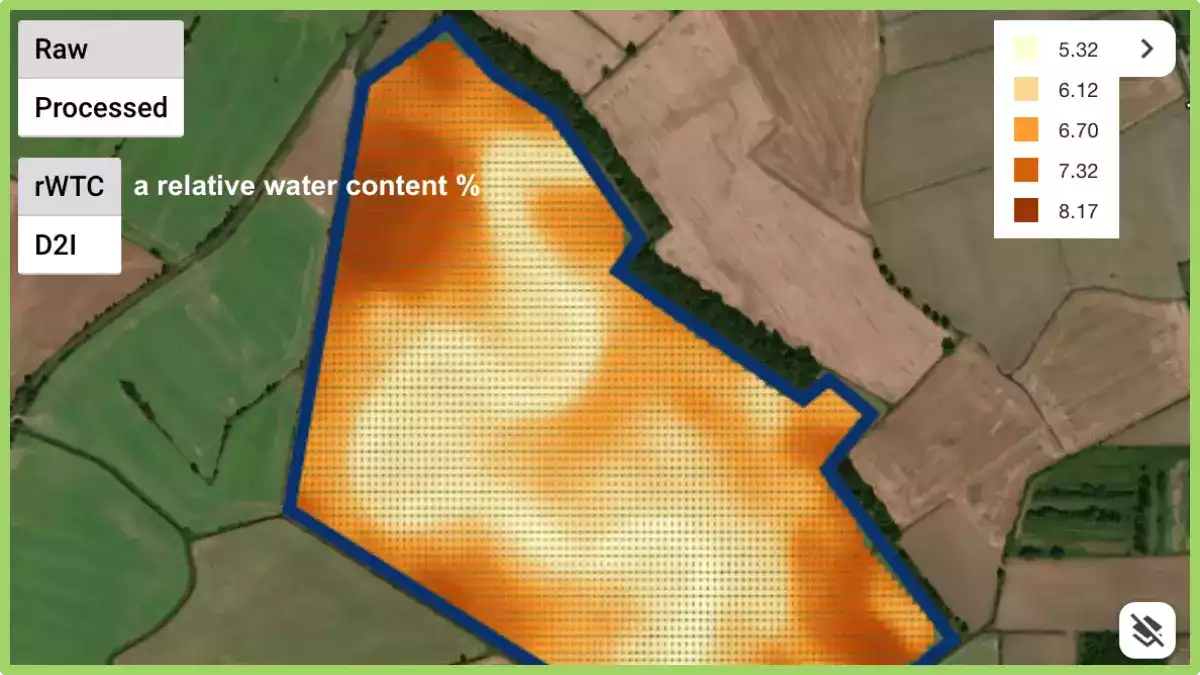
Analysoi geoprospektorien / pintakerroskartoituksen tietoja

GeoPard pystyy käsittelemään ja analysoimaan erityyppisiä maatalouden paikkatietoja. Tämä on esimerkki työskentelystä tiheiden anturiaineistojen kanssa, joilla on suuri paikkavaihtelu, jonka tarjoaa Geoprospectors Oy

Kun olet tuonut tallentamasi tiedot Pintamaan kartoittaja, voit nähdä 

  • suhteellinen vesipitoisuus
  • syvyys, joka liittyy tiivistymistä koskeviin tietoihin
  • sähkönjohtavuus 4 kumulatiivisella syvyydellä
Suhteellinen vesipitoisuus, raakapisteet

Geopardin avulla voit nähdä pisteitä raaka-arvoineen ja yhtenäisenä pintana; vertailla eri tietokerroksia; rajata maaperävyöhykkeitä vyöhykkeellistä maaperänäytteenottoa ja VRA:ta varten; yhdistää TopsoilMapper-tiedot GeoPardissa saatavilla oleviin tietoihin, kuten historialliseen ja nykyiseen kasvillisuuteen sekä korkeuteen, yhdeksi vyöhykekartaksi. 

Vertaile kerroksia: kasvillisuus (WDRVI), vyöhykekartta (EC+korkeus), EC, tiivistyminen


Haluatko tietää, mitä alhaiset EC-arvot edustavat kartalla käyränä? Tämä on ikivanha, maan alle haudattu joenuoma.

Vertailu datakerroksista peltokasveja koskevien päätösten tekemiseksi

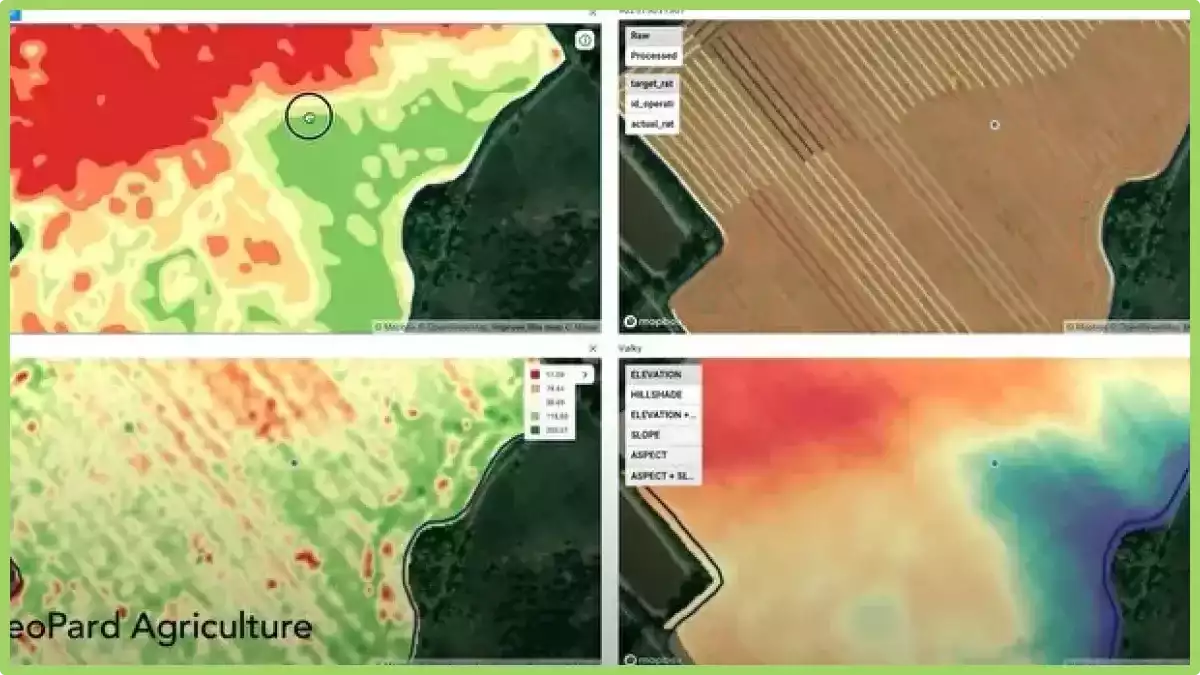
Kenttädatan visualisoimiseksi ja tietoon perustuvien päätösten tekemiseksi on usein tarpeen vertailla tasoja useissa synkronoiduissa näkymissä.

GeoPardissa voit vertailla visuaalisesti jopa neljää tietokerrosta yhdellä näytöllä. Kaikki kerrokset toimivat synkronoidusti, kun zoomaat sisään/ulos tai siirrät karttaa mukavuutesi mukaan.

Miten siirryn jaetun näytön tilaan? Valitse kenttä ja napsauta tasojen vertailukuvaketta näytön oikeassa yläkulmassa. Valitse sitten kaikki tilannekuvat, kenttien hallinta-alueet tai muut tasot, jotka haluat nähdä samalla näytöllä samanaikaisesti. Napsauta Vertaa tasoja. 

Tasojen vertailutoiminto synkronoi kartat, kursorit ja zoomaustasot. Voit myös lisätä/poistaa tasoja. Tällä hetkellä tuemme jopa neljää tietotasoa.

Mitä ovat täsmäviljelyn tietokerrokset?

Täsmäviljelyssä datakerrokset viittaavat erityyppisiin tietoihin, joita kerätään ja analysoidaan, jotta voidaan tehdä tietoon perustuvia päätöksiä viljelykasvien hoidosta. Näihin kerroksiin voivat kuulua:

  • MaaperätiedotTietoa maaperän ominaisuuksista, kuten ravinnetasoista, pH-arvosta ja rakenteesta, jotka voivat auttaa tekemään päätöksiä lannoituksesta ja muista maaperän hoitokäytännöistä.
  • Säätiedot: Tiedot nykyisistä ja historiallisista säämalleista, kuten lämpötilasta, sateesta ja tuulesta, voivat auttaa viljelijöitä tekemään päätöksiä istutuksesta, kastelusta ja muista käytännöistä.
  • SatotiedotKasvien kasvua ja terveyttä koskevat tiedot, mukaan lukien kasvien korkeus, lehtipinta-ala ja klorofyllitasot, voivat auttaa tekemään päätöksiä lannoituksesta, kastelusta ja tuholaistorjunnasta.
  • TuottotiedotTiedot sadosta ja laadusta voivat auttaa viljelijöitä tekemään päätöksiä sadonkorjuusta ja markkinoinnista.
  • Topografiset tiedotTiedot maan muodosta ja korkeudesta voivat auttaa tekemään päätöksiä istutuksista ja kastelusta ja tunnistamaan alueet, jotka saattavat olla alttiita eroosiolle tai muille ympäristöongelmille.
  • Kaukokartoitustiedot: Satelliiteista, droneista tai muista etäantureista kerätty data voi antaa tietoa sadon terveydestä, maaperän kosteudesta ja muista tekijöistä, jotka voivat auttaa tekemään päätöksiä sadonhoidosta.

Analysoimalla ja integroimalla näitä eri tietokerroksia viljelijät voivat tehdä tietoisempia päätöksiä viljelystä, mikä johtaa tehokkaampiin ja kestävämpiin viljelykäytäntöihin.

Agriculture Zones Operations For Data-Driven Decision

ZONES OPERATIONS ACROSS DIFFERENT LAYERS

In precision farming, field data collection and data-driven decision making are absolutely essential. As the next stage in the development of multi-layers analytics and finding dependencies across layers we introduce new module Zones Operations. 

There you can search for dependencies between different ag zones maps such as historical vegetation, topography including its derivatives, data from yield monitors, soil data, scanners, stability maps, and so on. This is a step forward in defining the most influenced areas and understanding the reasons for field heterogeneity. 

How can you identify the areas? 

First of all select field maps, you want to cross-investigate. A layer comparison view is a good approach to define specific agriculture zones for analyzing.

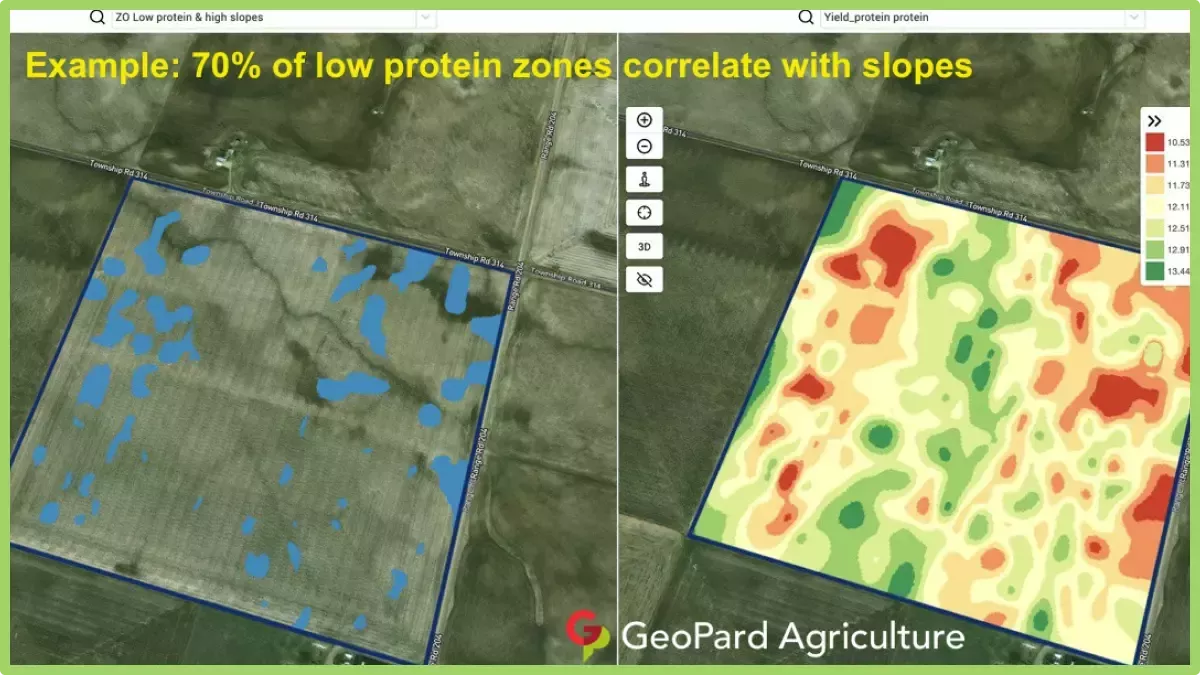
You may want to compare low yield potential and sloppy areas, most unstable zones and low vegetation, low electrical conductivity and yield, as applied fertilization map and current vegetation, and others.

Secondly, mark specific agriculture zones on every map you want to compare in the Zones Operations module. And finally, obtain a zone of interest. Note that it is possible to use more than two maps in analyses. 

How can you apply this knowledge? 

In addition to finding relationships that can help explain yield, it is possible to set yield goals for defined agriculture zones; to scout interesting areas; to reduce investments in such localized zones or build the plan of mitigating limiting factors and pull up underperforming areas knowing the underlying causes; to build agronomy plan using VRA practices. 

There are several examples of field insights on screenshots. Note that every field is unique and below-mentioned cases do not guarantee 100% same result for your field but it is a good way to start the investigation from. 

You are very welcome to share your agronomic practices by commenting on this post, contact the GeoPard Agriculture team directly. We are open to the feedback because we build the solution for you for a better understanding of field variability and managing it.

Vyöhykkeet Laatu

Lähes kaikki hoitovyöhykkeitä mukautetaan ennen kuin hänestä tulee vaihtuvakorkoinen sovelluskartta. Tämä voi tarkoittaa joidenkin vyöhykkeiden yhdistämistä, manuaalisia korjauksia tunnetuissa kohdissa, ylimääräisten puskurialueiden lisäämistä, maatalouslaitteiden yhteensopivuutta jne.

Me GeoPard-tiimissä ymmärrämme, että tarkat luonnonhoitovyöhykkeet, joissa on kelvolliset polygonit, säästävät paljon aikaa vyöhykkeiden tarkastus- ja korjausprosesseissa.

GeoPard-moottori toimii seuraavasti:

  • poistaa automaattisesti kohinan,
  • yhdistää automaattisesti pienet polygonit lähimpään isompaan alueeseen,
  • säilyttää vain tarvittavan vähimmäismäärän pisteitä jokaisessa vyöhykepolygonissa,
  • tekee VRA-kartoista yhteensopivia kaikkien maatalouslaitteiden ja -koneiden kanssa.

Automaattisen korjauksen lisäksi, työkalu vyöhykkeiden yhdistämiseen ja jakamiseen on käytettävissä, jotta voit mukauttaa karttaa oman peltotietämyksesi ja maatalouskäytäntösi mukaan. 

Markkinoilla on paljon erilaisia karttoja eri palveluntarjoajilta, mutta tunnistat varmasti GeoPard-kartat.

Merge and Split Zones for management in Agriculture

Nobody knows his field better than a farmer or agronomist who works with the field for many years. That’s why any algorithm-based analytics often needs to be validated and adjusted by a professional using his deep knowledge of the field.

Merge and split zones feature allows a professional to make a few important things: 

  • Split polygons
  • Merge polygons
  • Assign a polygon or a complete zone to another class

These adjustments can be applied for any data layer and it is a very useful feature to prepare YOUR perfect zones for precision ag operations like VR seeding, fertilizing or spraying.

What are splits in agriculture?

In agriculture, splits refer to the division or splitting of a field into different sections for various management practices.

This division allows farmers to apply different treatments or techniques to each section based on specific needs.

For example, farmers may split a field to apply different fertilizers, herbicides, or irrigation methods based on soil conditions or crop requirements.

Splits enable targeted and efficient application of resources, optimizing crop growth and minimizing costs while addressing specific challenges within different areas of the field.

Viljelykasvien valvonta vakauden ja suorituskyvyn analytiikan avulla


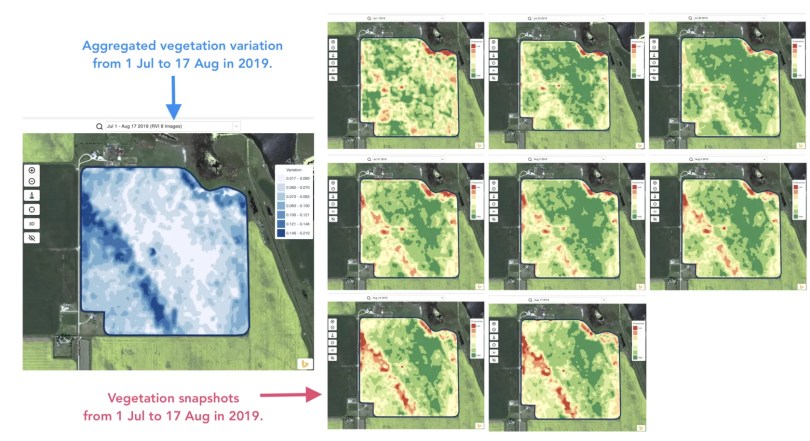
Detecting changes that happened in the field during the last 1-2 weeks or 1-2 months or even a couple of years helps to get insights about crop development.

It can be used to:

  • locate spots with similar performance across the 5-10-20 years and place the trials in areas with similar conditions to reduce the probability of mistakes,
  • track the changes during the season and evaluate crop performance during the growth,
  • recognize the damaged areas after a weather disaster or a disease or a pest attack and calculate damaged areas,
  • detect the difference between the last 2 images and control the crop performance.
Field Stability Zones

And all that and even more cases are covered with GeoPard Field Stability Zones. Especially, it will provide more insights together in combination with in-season and historical management zones.

Simply choose your field and satellite images to track the changes across them, control crops, and get insights about every spot in your field.

selection of field stability zones

Layers comparison

It’s no secret that we constantly enrich the GeoPard Agriculture solution and increase its value to users. Just look at the “coming soon” section of our website https://geopard.tech to get an idea of some features on the way.

Their prioritization can be challenging. Here, feedback and product demos come to the rescue. Thus, presenting our solution to many attendants of the World Agri-Tech Summit in London, we were able to adjust the delivery plan and release a new layers comparison feature just within a few days.

What is it about? You can visually compare field analytics side by side in a split view. It is possible to select any type of layers for comparison: imagery with natural or infrared colors, imagery with vegetation views, in-season or historical management zones. Two layers behave synchronously when you zoom-in / zoom-out or move a map for your conveniences.

How to enter the split view mode? Select your field and click compare layers icon in the top menu. On the split view screen, select the analytics layer using a searchable drop-down list located on the top.

enter the split view mode
choice of field analysts
comparison of field analysts

Monivuotiset vyöhykkeet

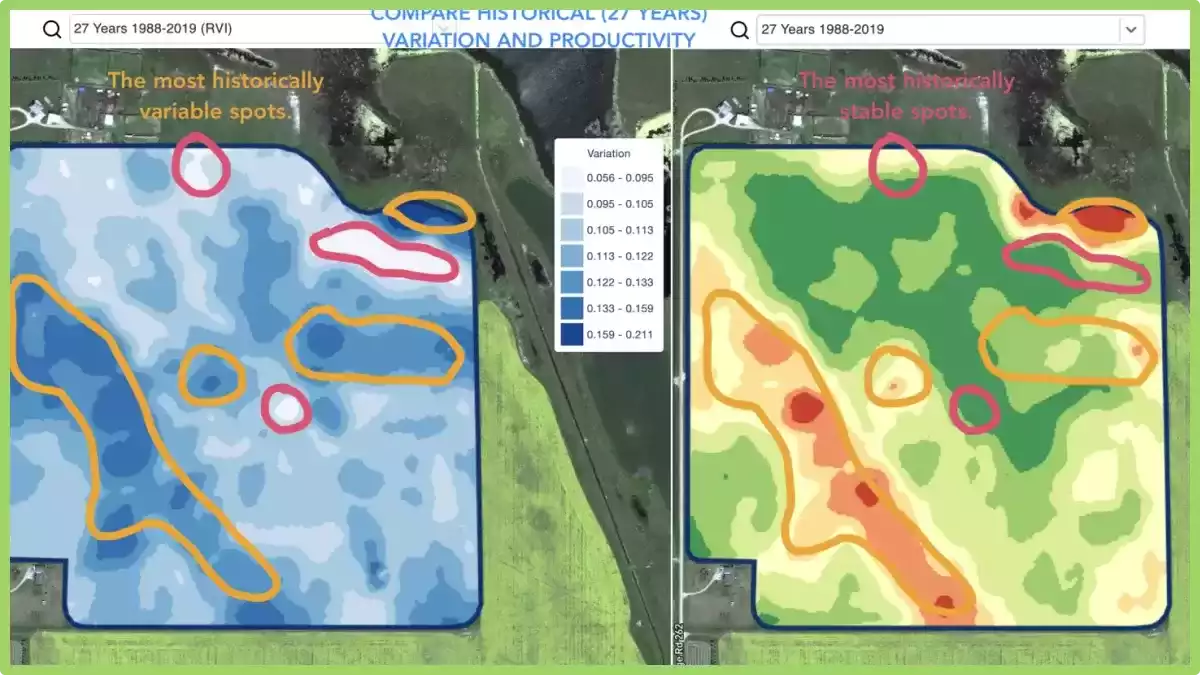
What does it mean? Historical (multi-year) management zones are built based on 30+ years archive of satellite imagery.

Images with peak vegetation during every season are automatically selected as inputs for analytics. Otherwise, every such image represents a potential yield file for the related year.


Historical (multi-year) management zones provide insights about every spot in the field.

How can you use it? The field crop development pattern helps to know the agricultural area better and to apply the right decision with the right input rates in the right spots.

Historical management zones could be used as a blueprint for prescription (Rx) files for seeding, fertilization, zones based soil sampling.

We support all regions by request.

What are Multi-Year Zones?

Multi-Year Zones in precision agriculture refer to specific areas within a field that exhibit consistent and distinguishable patterns of crop growth and yield over multiple growing seasons.

These zones are identified using various technologies such as remote sensing, GPS mapping, and soil sampling.

By analyzing the data collected from these technologies, farmers and agronomists can identify patterns of variability within a field and create maps that distinguish areas of high productivity from those with lower yields.

This information can then be used to optimize crop management practices, such as varying planting density, adjusting irrigation and fertilization rates, and even implementing precision harvesting techniques.

They provide a valuable tool for precision agriculture as they allow farmers to make informed decisions about resource allocation and crop management, resulting in improved efficiency, reduced costs, and increased yields.

By understanding the variability within a field and tailoring management practices to each specific zone, farmers can maximize the potential of their land and resources.


wpChatIcon
wpChatIcon

    Pyydä ilmainen GeoPard-demo / konsultaatio


    Hyväksymällä painikkeen painamisen hyväksyt meidän Tietosuojaseloste. Tarvitsemme sen vastataksemme pyyntöösi.

      Tilaa


      Hyväksymällä painikkeen painamisen hyväksyt meidän Tietosuojaseloste

        Lähettäkää meille tietoa


        Hyväksymällä painikkeen painamisen hyväksyt meidän Tietosuojaseloste