Merge and Split Zones for management in Agriculture

Nobody knows his field better than a farmer or agronomist who works with the field for many years. That’s why any algorithm-based analytics often needs to be validated and adjusted by a professional using his deep knowledge of the field.

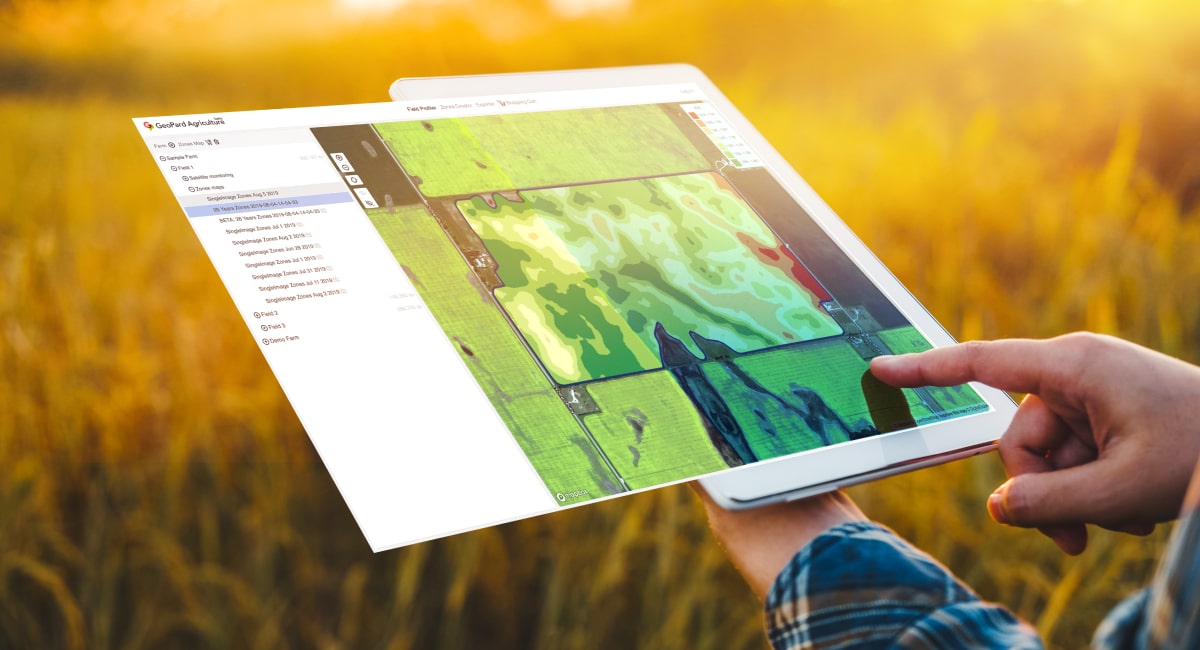
Merge and split zones feature allows a professional to make a few important things: 

  • Split polygons
  • Merge polygons
  • Assign a polygon or a complete zone to another class

These adjustments can be applied for any data layer and it is a very useful feature to prepare YOUR perfect zones for precision ag operations like VR seeding, fertilizing or spraying.

What are splits in agriculture?

In agriculture, splits refer to the division or splitting of a field into different sections for various management practices.

This division allows farmers to apply different treatments or techniques to each section based on specific needs.

For example, farmers may split a field to apply different fertilizers, herbicides, or irrigation methods based on soil conditions or crop requirements.

Splits enable targeted and efficient application of resources, optimizing crop growth and minimizing costs while addressing specific challenges within different areas of the field.
Crop control with stability and performance analytics


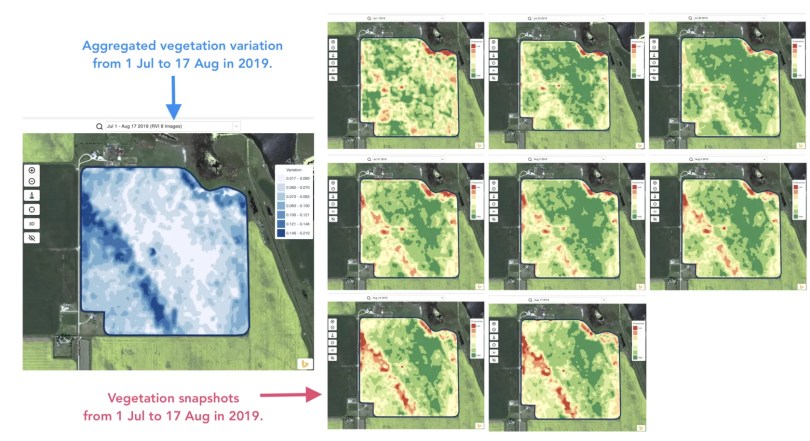
Detecting changes that happened in the field during the last 1-2 weeks or 1-2 months or even a couple of years helps to get insights about crop development.

It can be used to:

  • locate spots with similar performance across the 5-10-20 years and place the trials in areas with similar conditions to reduce the probability of mistakes,
  • track the changes during the season and evaluate crop performance during the growth,
  • recognize the damaged areas after a weather disaster or a disease or a pest attack and calculate damaged areas,
  • detect the difference between the last 2 images and control the crop performance.
Field Stability Zones

And all that and even more cases are covered with GeoPard Field Stability Zones. Especially, it will provide more insights together in combination with in-season and historical management zones.

Simply choose your field and satellite images to track the changes across them, control crops, and get insights about every spot in your field.

selection of field stability zones

Layers comparison

It’s no secret that we constantly enrich the GeoPard Agriculture solution and increase its value to users. Just look at the “coming soon” section of our website https://geopard.tech to get an idea of some features on the way.

Their prioritization can be challenging. Here, feedback and product demos come to the rescue. Thus, presenting our solution to many attendants of the World Agri-Tech Summit in London, we were able to adjust the delivery plan and release a new layers comparison feature just within a few days.

What is it about? You can visually compare field analytics side by side in a split view. It is possible to select any type of layers for comparison: imagery with natural or infrared colors, imagery with vegetation views, in-season or historical management zones. Two layers behave synchronously when you zoom-in / zoom-out or move a map for your conveniences.

How to enter the split view mode? Select your field and click compare layers icon in the top menu. On the split view screen, select the analytics layer using a searchable drop-down list located on the top.

enter the split view mode
choice of field analysts
comparison of field analysts

Multi-Year Zones

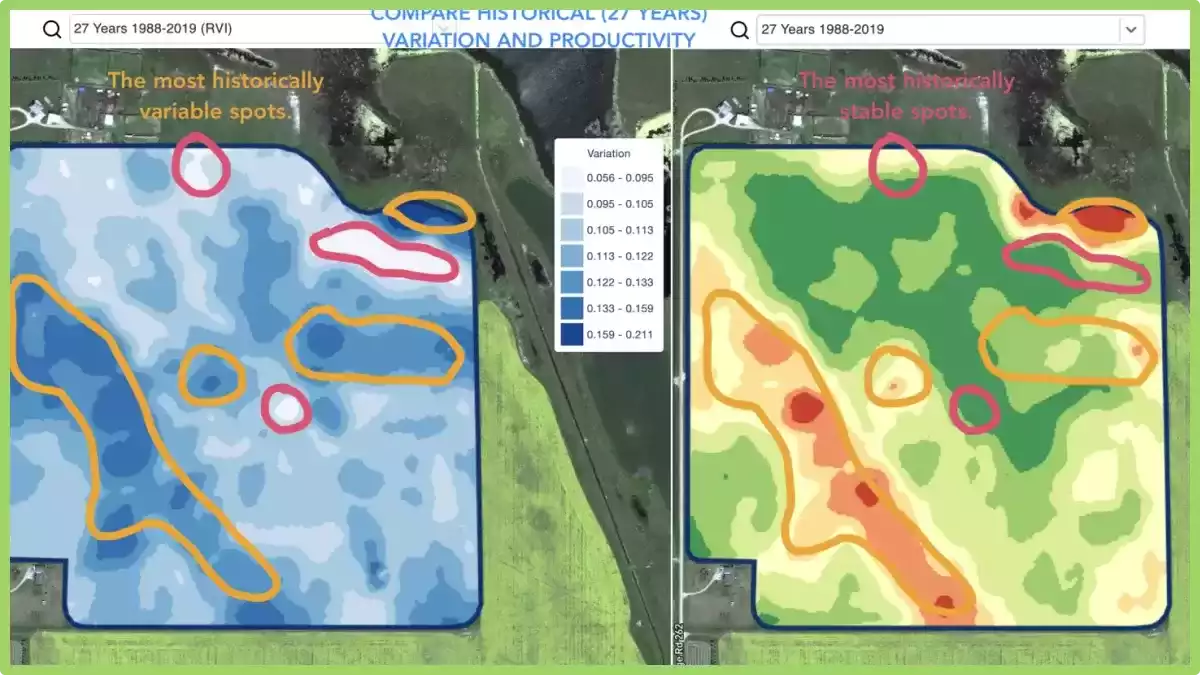
What does it mean? Historical (multi-year) management zones are built based on 30+ years archive of satellite imagery.

Images with peak vegetation during every season are automatically selected as inputs for analytics. Otherwise, every such image represents a potential yield file for the related year.


Historical (multi-year) management zones provide insights about every spot in the field.

How can you use it? The field crop development pattern helps to know the agricultural area better and to apply the right decision with the right input rates in the right spots.

Historical management zones could be used as a blueprint for prescription (Rx) files for seeding, fertilization, zones based soil sampling.

We support all regions by request.

What are Multi-Year Zones?

Multi-Year Zones in precision agriculture refer to specific areas within a field that exhibit consistent and distinguishable patterns of crop growth and yield over multiple growing seasons.

These zones are identified using various technologies such as remote sensing, GPS mapping, and soil sampling.

By analyzing the data collected from these technologies, farmers and agronomists can identify patterns of variability within a field and create maps that distinguish areas of high productivity from those with lower yields.

This information can then be used to optimize crop management practices, such as varying planting density, adjusting irrigation and fertilization rates, and even implementing precision harvesting techniques.

They provide a valuable tool for precision agriculture as they allow farmers to make informed decisions about resource allocation and crop management, resulting in improved efficiency, reduced costs, and increased yields.

By understanding the variability within a field and tailoring management practices to each specific zone, farmers can maximize the potential of their land and resources.


Satellite Agriculture Monitoring For Field Analytics

What does it mean? GeoPard provides access to 30+ years of an archive of processed, calibrated, and cleaned satellite image data with comprehensive sets of views. The views are calculated against every satellite image in the blink of an eye. 

Deep in-season and historical field analytics is the basis of the GeoPard solution.

What is satellite agriculture monitoring?

Satellite agriculture monitoring refers to the use of satellite-based remote sensing technologies to gather information about agricultural crops and the land they are grown on.

This technology allows farmers and researchers to track crop growth, detect changes in vegetation health, measure the extent of land use, and monitor environmental conditions from a distance.

By analyzing satellite images, farmers can detect problems early, such as nutrient deficiencies, pests, and diseases, and take corrective actions before they cause significant damage to crops.

The data obtained from satellite imagery can also be used to optimize irrigation schedules, predict yield, and estimate crop production.

Satellite agriculture monitoring can provide valuable insights for agricultural management, allowing farmers to make more informed decisions and improve their yield and profitability.

It also plays an important role in food security and sustainability by enabling more efficient use of natural resources and reducing the environmental impact of agriculture.

How can you use satellite agriculture monitoring?

In near-real-time, you can monitor crop development including retrospective analysis and condition assessment, scout for areas with different levels of growth, detect anomalies and, for sure, compare your farm with neighboring fields and areas.

Further, it can be used in several ways to benefit farmers and researchers. Here are a few examples:

  • Crop monitoring: Satellite imagery can be used to monitor crop growth and development over time. By analyzing satellite images, farmers can track the health of their crops, identify areas of stress or disease, and adjust their management practices accordingly.
  • Yield prediction: Satellite data can be used to estimate crop yields based on vegetation indices, soil moisture, and other parameters. This information can help farmers make informed decisions about harvest schedules and marketing strategies.
  • Irrigation management: Satellite imagery can be used to monitor soil moisture levels and crop water use, allowing farmers to optimize their irrigation schedules and reduce water waste.
  • Soil mapping: Satellite imagery can be used to map soil properties such as texture, organic matter content, and nutrient availability. This information can help farmers make more informed decisions about fertilization and other soil management practices.
  • Pest and disease monitoring: Satellite imagery can be used to detect areas of pest and disease infestation, allowing farmers to take preventive measures before significant damage occurs.
  • Land use mapping: Satellite imagery can be used to map land use patterns and changes over time. This information can help policymakers and researchers better understand land use dynamics and develop more effective land use policies.

Overall, satellite agriculture monitoring provides a wealth of information that can help farmers and researchers make more informed decisions and improve agricultural productivity and sustainability.

Use of Heterogeneity Factor in Precision Agriculture

One of the unique insights that GeoPard can provide is the Heterogeneity Factor of your fields.

What does it mean? This number shows the level of heterogeneity/variability of your fields. The more variability field has – the more need for precisionag technologies. Especially, it is very useful in pair with GeoPard’s multi-year analytics (30-year history). 

What is Heterogeneity Factor?

Heterogeneity factor in precision agriculture refers to the variation in soil and crop characteristics within a given field. It can be caused by differences in topography, soil type, nutrient availability, water content, pest pressure, and other factors that affect plant growth.

In precision agriculture, the goal is to manage this by using site-specific information to apply inputs such as water, fertilizer, and pesticides at the right time and in the right amount to maximize crop yield and quality while minimizing environmental impact.

This requires the use of sensors, mapping technologies, and data analysis tools to create detailed maps of the field that can guide management decisions.

Its understanding is important because it can help farmers optimize their management strategies and increase their profitability.

By tailoring inputs to the specific needs of each area within a field, farmers can reduce input costs, increase crop yields, and improve overall crop health.

How you can use it?

If you have many fields, it can help you to understand, which fields to target first with Variable Rate Applications (seeding, fertilizing, spraying). 

By mapping the variations in soil and crop characteristics within a field, farmers can identify areas that have different needs and apply inputs at variable rates accordingly.

For example, areas of a field that have high nutrient availability may not need as much fertilizer as areas that have low nutrient availability. Similarly, areas of a field that have a high density of weeds may require more herbicide than areas with fewer weeds.

By using VRA, farmers can reduce input costs by applying inputs only where they are needed, and avoid over-application of inputs that can lead to environmental degradation.

This approach can also lead to higher crop yields and better quality crops, as inputs are tailored to the specific needs of each area within the field.

Therefore, understanding the heterogeneity factor in precision agriculture is crucial for making informed decisions about where to apply inputs and at what rates, ultimately leading to better management practices and increased profitability.

You save the most on chemicals on the most heterogeneous fields!

What is heterogeneity service?

In agriculture, it refers to the recognition and utilization of the natural variation or heterogeneity within a field or landscape. It involves understanding and leveraging the diverse characteristics of different areas to optimize agricultural practices.

The services can include precision agriculture techniques such as variable rate applications, site-specific management, and targeted interventions based on the specific needs of different zones or areas within a field.

By harnessing it, farmers can enhance resource efficiency, improve crop productivity, and minimize environmental impacts.

wpChatIcon
wpChatIcon

    Request Free GeoPard Demo / Consultation


    By clicking the button you agree our Privacy Policy. We need it to reply to your request.

      Subscribe


      By clicking the button you agree our Privacy Policy

        Send us information


        By clicking the button you agree our Privacy Policy